KA SCHOOL is the important stuff

Friday, 25 March 2016

ENGLISH SYNTAX COLOURISER!!! : Colourising parts of speech. Nice.

This Web App Highlights English Syntax Like It's Code

Gizmodo · by Jamie Condliffe


Don’t know your adverbs from your adjectives? This little web app colors text so that each part of speech is a different hue—just like text editors that highlight the syntax of different coding languages.
You can copy a tranche of text into the box, hit tab, and the secrets of our peculiar language are illuminated before your very eyes. To make sense of what you’re looking at, here’s a description from the creator about what you can see.


March of the A.I. (But April of the V.R.)

So as predicted Artificial Intelligence has moved closer to the front pages of popular daily papers and taking the headliner spots on major media.

Next month will be nothing but VR as 4 or 5 major companies will be releasing their products.
Expect to hear about little else in a few weeks.

Here are some of the stories of note regarding A.I. in the last few months alone!

A novel written by a Japanese AI passed the first round of a national literary prize


South Korean Government Announces Nearly $1 Billion in AI Funding


Friday, 12 February 2016

AI GO

Google's AI is Scheduled to Compete Against the Highest Ranked "Go" Player in the World

futurism.com · by Sarah Marquart
In Brief
Google's AlphaGo technology will take on the top-ranked Go player in the world. The match, which will be shown live on Youtube, could have major implications for the AI company.
Google’s artificial intelligence (AI) software, AlphaGo, will compete in Go against the highest ranked player in the world, Lee Sedol.
Demis Hassabis, the head of the Google DeepMind lab behind its AlphaGo AI system, announced that the five-game match will be held March 9, 10, 11, 12, 13, and 15 in Seoul, South Korea. A $1 million prize is in store for the winner.
A New Champion?
This isn’t the first time AlphaGo will be competing at Go, in fact, that’s what it was made to do. AlphaGo is an algorithm that has mastered the game. The AI system played against the French champion, Fan Hui and beat him 5-0.
Google’s DeepMind is using on a type of AI called deep learning, which involves training artificial neural networks on data — such as photos — and then getting them to make inferences about new data.
In this case, the AI predicts which moves to play next by researching expert Go players’ moves in games. It uses a process of trial and error, effectively getting smarter by playing itself.
The Winner Is…
Lee Sedol (left) at the Price Information Cup final, 2010, Source
This doesn’t mean the AI system is the clear-cut winner this time, though.
“I have heard that Google DeepMind’s AI is surprisingly strong and getting stronger, but I am confident that I can win at least this time,” Sedol said in a statement.
If AlphaGo does lose, it would all be seen in real time by a large audience. This type of well-publicized loss could end badly for Google, especially when AI technology is so competitive right now.
However, if AlphaGo is able to win, it could be huge for Google, and could help them compete with companies like Facebook, Microsoft, and Magic Leap.
“If we win the match in March, then that’s sort of the equivalent of beating Kasparov in chess,” Hassabis told reporters in a press briefing on the Nature paper last month. “Lee Sedol is the greatest player of the past decade. I think that would mean AlphaGo would be better than any human at playing Go. Go is the ultimate game in AI research.”
“Ultimately we want to apply these techniques in important real-world problems,” such as climate modeling or medical diagnostics, Hassabis said.

Smiley Clips

I have no idea what to file these under. I just thought they might be a nice addition to printed score reports for the kids.

http://amzn.com/B00EKLNU34

Thursday, 11 February 2016

Score! For us.

As I've mentioned previously I'm personally backing the HTC VIVE for VR headsets as I predicted they will simply be cheaper, better and support many more systems than the Oculus. Despite the fact that I have spent my own money on two versions of the Oculus and then they spit on mac developers and now I am an angry angry man.... grr.

Unity is my main development area and I had guessed this connection was going to happen. It was practically inevitable.

Jab


Valve Brings SteamVR to the Unity Platform – Unity Blog

blogs.unity3d.com · by JP Hawkins

Valve Brings SteamVR to the Unity Platform

, February 10, 2016 in EventsTechnology

Today, during the opening keynote of the inaugural Vision VR / AR Summit, Valve and Unity Technologies announced a new collaboration to offer native support for SteamVR in the Unity Platform, giving developers new reach at no extra cost. Additionally, we will be adding a new VR rendering plugin to further enhance functionality.

The collaboration means that all of Unity’s developers will have access to native support for Valve’s upcoming SteamVR platform. Beyond SteamVR support, Valve has developed an advanced rendering plugin for Unity to further enhance fidelity and performance, bringing consumers more realistic experiences.
Valve co-founder Gabe Newell announced the news during a special video address at the Vision Summit, adding: We made many of our Vive demos using Unity, and continue to use it today in VR development. Through that process, and in working with VR developers, we found some opportunities to make Unity even more robust and powerful for us and really want to share those benefits with all VR content creators.”
Unity CEO John Riccitiello went on to discuss the news during the Vision Summit opening keynote: “Valve and Unity are both dedicated to creating the highest quality VR experiences possible. That means giving developers every possible chance to succeed, and our collaboration with Valve is designed to do just that.”
Valve will also be providing a talk at Vision, and to celebrate the launch, they are surprising every developer at the conference with a free HTC Vive Pre, the latest SteamVR development system. For more information, please visithttp://visionsummit2016.com/

Monday, 8 February 2016

VR WOW

Watching VR games get built in VR will blow your mind | Cult of Mac

cultofmac.com · by Buster Hein · February 5, 2016
Virtual Reality isn’t just going to change how we consume content. It’s going totally change how we make content for the digital world too.
Developers at Epic Games have already created a way to build VR games using the Unreal Editor in VR mode, and it’s unlike any software development tool you’ve ever seen. Rather than clicking around on a 2D screen, designers Tim Sweeney and Mike Fricker show how game makers can walk around inside levels to manipulate objects and get everything just right.
Take a look:
The coolest part is you can use the VR mode to create VR games or boring old 2D stuff.
Epic Games is currently using a HTC Vive for the VR headset and an Oculus Touch controllers. The company says it plans to reveal more details about editing in VR mode for Unreal Editor — along with a release date — at GDC on March 16th.

Friday, 5 February 2016

JABS NOT JABS

I've introduced a couple of new labels so that you can quickly find what I have made or written myself and what I have not.

The non Jab items are usually just links to cool tech.


Tuesday, 2 February 2016

KAIS JAB LABS - Robots, robots everywhere!

This has taken a while but I finally made some progress tonight.
I was using devices with the logo on it just because I live in the dark; technically any piece of paper with the logo printed on it will do.

It can be used in many ways : to unlock a game on the iMacs, show a hidden 'thing of the day' whenever the kids hold the logo to the camera or much more. (Yes, even educational stuff).

Forgive the bad editing, I just wanted to get it online for you to see.


Sunday, 31 January 2016

Introducing : HAMMER

I'll be adding a new character to any new games or learning apps in the future. He will act as a unifier and a guide, not necessarily a part of the interactive itself. Although he might just appear in a few side games.

Hammer will also act as an 'authoritative' figure if needed. When his eyes turn RED then he is in full danger mode. For example, when we have a large monitor in the eating area, Hammer can appear on screen with the red eye lights watching movement and turning toward loud sound. Of course, he can also do funny things too, take pics, point at people etc. The watchful part is just a version of the 'card-board policeman technique' and is an old one and still works today. In the UK, they used to use the occasional Police cutout to slow down drivers who would see the police shape in their peripheral vision. But an interactive watching robot can actually calm down a group of boisterous kiddies too. See the first bullet point below.

Hammer can also be used in the Lobby area to watch people coming and going. In fact, if placed right, he might be able to greet or say goodbye to people as they come and go. He can also give important announcements, be 3D printed and lots more.

If you want an art project, I can actually supply a series of cutout templates and instructions for making a 2m tall version by hand from old cardboard.


H.A.M.M.E.R.


  • Hammer can act as the bridge between the teachers and students. In the original document I spoke of a gripe/rant wall where students can anonymously write ANYTHING they would like to see changed or bring to our notice. Hammer can front that page. On the other hand, Hammer can deliver messages to students, such as 'CHEW YOUR FOOD WITH YOUR MOUTH CLOSED'  or 'WHOMEVER MADE THAT MESS, CLEAN IT UP!', taking that load or slight confrontation from the teachers hands.
  • Hammer is practically indestructible and can be blown up, burned, buried, crushed, thrown and dropped without getting a scratch. In fact, he kind of likes it, especially explosions.
  • Hammer doesn't speak but relies on the fact that two thirds of communication is body language. He has lots of inventive ways to communicate.
  • When he is in a good mood his eyes are green; but be careful when they turn red!
  • He tends to leak oil everywhere. We're looking into that.
  • Can run through walls and have them crash down around him. It's a hobby.
  • Hammer has a pet robot thing. It needs a name. 
  • Hammer has a brother (he's a different colour).
  • Hammer keeps his own blog. For example........


Hammer only recently arrived in Japan and we took him to a local park in Tokyo and also to Nikko.


In Nikko we found that snow and selfies are a problem for robots....


Hasn't figured out the selfie thing yet


Nice app - Gives the news at 5 reading levels automatically. Tests too!


Newsela helps students improve their literacy by reading the news

appadvice.com · by AppAdvice Staff Author
According to the National Assessment of Educational Progress, nearly two thirds of students in the U.S. are not reading at their grade level. Fortunately, there are organizations that seek to improve that statistic. One of them is Newsela, which has just launched its official iOS app to better help students tap into the full potential of their reading ability.

Know the news

As its name suggests, Newsela has to do with news. Specifically, Newsela delivers the news to be read by students at just the right reading levels.
With the app, students can access relevant news articles from renowned sources such as Associated Press, Scientific American, and the Washington Post. More interestingly, they can also adjust the wording of the articles to any of five reading levels by simply swiping upward or downward with two fingers, thereby aiding in their comprehension and competency enhancement while keeping them engaged in current events and other interesting nonfiction subjects.
For example, as shown in the app’s promo video below, the phrase, “revered for her unlikely ascendance in an arts world notorious for showcasing only lithe white ballerinas,” may be simplified as, “deeply respected and admired for her unlikely rise in an arts world notorious for showcasing only slim white ballerinas,” by dragging down on the article in Newsela.
If you can’t see the video embedded above, please click here.

Level up

After reading articles, students can take quizzes in the app to test their reading skills. As they read and take quizzes, Newsela automatically adjusts the reading level to challenge them and push them to boost their literacy. They can also track their progress over time in the app.
Compatible with iPhone, iPod touch, and iPad running iOS 8.1 or later, Newsela is available now on the App Store for free.
Newsela works both online and offline for searching and reading articles, and for taking quizzes.
Newsela also works to help educators in improving their students’ literacy through assignments and progress tracking. If you’re a teacher, parent, or school administrator, just choose “I’m an Educator” instead of “I’m a Learner” when signing up.

Paperless classrooms with iOS

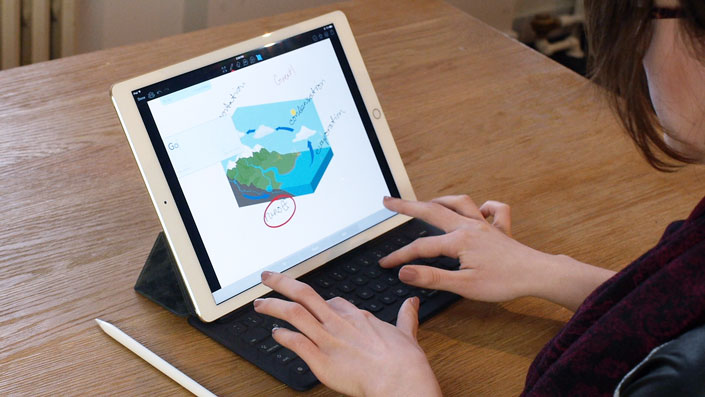
Paperless classroom app Showbie now optimized for iPad Pro and Apple Pencil

appadvice.com · by AppAdvice Staff Author
Apple has transformed the way educators teach and students learn, and it’s thanks in no small part to iOS devices and apps that run on them to make teaching and learning easier. One of these apps is the paperless clasroom appShowbie, which has just received a significant update.
If you’re a teacher, you can use Showbie to easily assign, collect and review your students’ work from other apps, or have your students complete assignments using the app’s built-in rich annotation tools or using apps that are compatible with Showbie.
Showbie is available for iPhone as well as iPad. But in the main, the app is optimized for iPad. And this is made more apparent by its latest update, which delivers improvements for Apple’s newer tablets.

iPad multitasking

First up, the latest update to Showbie adds support for iPad multitasking in iOS 9.
On iPad Pro, iPad Air, iPad Air 2, or iPad mini 2 or later, you can use Slide Over to quickly check Showbie over another app. And on iPad Pro, iPad Air 2, or iPad mini 4, you can use Split View to use Showbie side by side with another app at the same time. “Maybe you’d like to consult a grading rubric while annotating and grading student work in Showbie,” the Showbie team notes, “or have your students browse online resources while working on their assignment.”

iPad Pro support

Showbie is now also fully optimized for iPad Pro. If you have Apple’s 12.9-inch tablet, you’ll be able to see more content at once in Showbie, even in portrait mode. You’ll also be able to see more even when you’re typing feedback if you use a Smart Keyboard with your iPad Pro, since the onscreen keyboard need not be displayed.
What’s more, Showbie is now compatible with Apple Pencil, allowing you to make smooth and accurate annotations with palm rejection support.

Teach and learn with Showbie

The new version of Showbie also features improved VoiceOver support and improved language support.
Moreover, it includes adjustments to parent access to assignments (which was added to Showbie last month), making parent access disabled by default when a new class is created.
If you can’t see the video embedded above, please click here.
Compatible with iPad running iOS 8.0 or later, Showbie is available on the App Store for free, with a $11.99 in-app purchase for unlocking the app’s Pro features including quantitative grade tracking, richer feedback, larger file size support, assignment locking, and complete parent access to assignments.

Thursday, 21 January 2016

Real Movement in VR #2

A smaller earlier version of a similar tech:

This one is quite simple and more practical for school use.


Real movement in Virtual Reality #1

http://futurism.com/the-new-infinadeck-lets-users-explore-immersive-virtual-worlds/

The New Infinadeck Lets Users Explore Immersive Virtual Worlds - Futurism

futurism.com · by Sarah Marquart
In Brief
Introducing the Infinadeck. Paired with a VR headset, this technology could transform how we exercise, train, and step in virtual reality.
The Infinadeck isn’t your grandma’s treadmill. In fact, paired with a VR headset, you can explore immersive new worlds–kind of like the holodeck in Star Trek.
Go Anywhere, Do Anything
Meet the world’s first commercially-viable omnidirectonal treadmill– meaning you can walk on it in any direction. The treadmill reacts to the user’s movement to keep them safely in the center. The Infinadeck is also equipped with a customizable support system that straps comfortably around the user’s waist and keeps them secured.
The treadmill is only 1.3m x 1.7m (4.4ft by 5.6ft) and weighs in at 255kg (500lbs). The machine stands a mere .4m (16in) off the ground. You’ll definitely want a friend (or three) to help you move it in, but it’ll only take up as much space as a large table.
Worried about noise? The Infinadeck’s two motors are actually pretty quiet.
In fact, it’s actually quieter than the average dishwasher. One of the motors moves the platform like a regular treadmill, while the other moves the belt in the perpendicular direction.
The power consumption even comes in at under 1200 watts, about the same as the average refrigerator.
Markets and Uses
The machine is targeted toward customers looking for “precision, high-end, controlled omnidirectional walking solutions,” according to the company’s website.
Also:
  • People who want to pretend they’re in Star Trek
  • People who think staring at a blank wall during exercise is boring
More importantly though, people with risky jobs could benefit from training in a virtual environment. The tool would also be useful for physical therapy, tactical training, and something the company calls “exergaming.”
The company says that the treadmills will be available to strategic business partners, and expects to produce a lower priced consumer model in the near future.

Wednesday, 20 January 2016

DISPLAY UNITS - CONTROL - A BIG GLOWING BUTTON

Although we are installing iMacs that are meant as passive or hands off interactive experiences that doesn't mean we can't add another layer of interaction. Take the 'ANXIETY ALIEN' for example. This one is not meant for the display units but rather for keyboard and laptop use. The idea being that the user drags a slider up and down to change the anxiety of the alien.
However, with the addition of a Griffin Powermate button we could run more complex interactives on these display units...


I've used this little beauty hundreds of times in the past and it still looks awesome even after a decade or so. It's basically a pulsing blue button, but you can double tap it, turn it, press and turn etc.

I programmed the 'Anxiety' of the alien to increase as you turn the dial and it's a great way to interact.

Also, it can even be used for the TaskMaster type games. You turn the dial to select an answer and hit the button to choose it. 

This cheap bit of tech means we can run just about everything we make on the display units.

(I labelled this as JABS as it directly relates to our interactives but I did not make the button unfortunately)

FREE JAB GAMES FOR iPHONE & iPADS

Despite my ongoing fun with famous people some of my games still seem to be available in the app store. These are free with no ads or in-app purchases. Any kids with iphones or ipads are welcome to try them so please send on the links if you think they will be interested.

J


BIRD UP!... 

is one and can be downloaded here:
https://itunes.apple.com/app/bird-up!/id557588588?mt=8

It has a few extra game modes, lots more noises and things to see and runs on any iphone or ipad.
It uses the same flapping technique as the desktop version.
Please feel free to pass the link around to the students. It is totally free with no hidden extras.


-------------------------------------------------------------------------------------------------


SUMO - TOUCH VERSION:

https://itunes.apple.com/app/omnimotion-sumo-lite/id421134847?mt=8

A finger(s) touch version of the Sumo Game. This is the 'Lite' version but there is still plenty to do. It has a 5 star rating and a UN award under its sweaty belt.

(Safe for kiddies of all ages)


-------------------------------------------------------------------------------------------------


SKYHUNT:


Probably one for the otaku. You can motion control a ship and fly around a city hunting for invaders. It can get quite fun chasing robotic spies and blowing them up around skyscrapers!
Again 5 star reviews and utterly free.

https://itunes.apple.com/us/app/skyhunt/id562228326?mt=8


ENJOY!


THE BIRDIE - KAIS VERSION

THE BIRDIE

Originally this piece was created for a friends 2 year old daughter. She was a Teletubbies junkie who sat in front of the screen for hours and hours. So I took a few hours and made the original version. She spent that day and many more jumping around, teaching the bird to fly. Then teaching her friends to teach the bird to fly.

It's a simple game but I think Jonah got to see the effect it can have on the mini-humans that inhabit the KAIS building.


There is a lot to see the further up you get.

Tuesday, 19 January 2016

ANXIETY ALIEN - APP DELIVERY TESTING AND AN EXPERIMENT

In time the TaskMaster type FlashCard games will keep records of words, concepts and course sections that the students find quite hard or downright impossible to remember.
I think every teacher would agree that they've noticed that there are some words , concepts or grammar points that nearly every student struggles with.

As a personal example being a foreigner, the GA & WA difference seems to be one that gets nearly all of us at first.

So, in these special cases, I propose that we create a serious of apps and interactives that will unstick the brain and allow the course to flow.

To this end I've created one example of this using the TaskMaster word 'Anxiety'. Using the alien from the game I've made a little interactive that has a lot of helpful information on screen, some mnemonics perhaps and a slider that allows the student to take the alien from a very calm state to one of pure anxiety. As they drag slider they are presented with some character acting from our little friend and about a dozen differently worded uses and forms.


However, as I was creating this little sample from scratch, I took the opportunity to fully optimise it and put it on as many machines and in as many different ways as possible.
The results were more than promising.

The actual UNITY file, with its backgrounds, code, textures etc is 1.5 GIGS. But that's the usual horrendous disk squatting.
Creating it as a desktop app (mac or pc) came out as about 85MBs. Not bad, but not something you want everybody to have to download.
Optimising it and placing on a webpage? This is where it got interesting. It took some fiddling, some corners cut and techniques I haven't used in over a decade but the ENTIRE little interactive, exactly as you see above, sits on a webpage for...... 5MBs.
Just to underline that, if we added more animations and words but used the same graphics and character above that size would hardly change! Plus the amount of time the page was loaded, times, length of interaction etc. could all be recorded invisibly in the background.

The futures of these little apps is looking bright; compressed & optimised but very bright.

You can view the online version here (mac & pc browsers)* : ANXIETY_ALIEN_EXAMPLE
*shockingly it sort of works on iphones and ipads too!

As an aside, I'd like to put this on an iMac somewhere in the school and just leave it. See if any of the kids go near it, interact with it and if so, do they then show another student?
Basically slap an alien and a slider on screen and watch what happens. Kids learning by mistake or willingly? Shocking.


Sunday, 17 January 2016

DISPLAY UNITS FOR THE SCHOOLS - FINAL ANALYSIS

From experience I've installed and created items for a dizzying array of shows, kiosks, presentations, exhibitions, hospitals, educational, museum and schools in the last 20 years. These were placed on the sides of buildings, office fronts, remote islands, cinemas, shop windows and even throughout the Barcelona Film Festival, Spain for the King, Rome for the head of Samsung worldwide, just to name a few.

Thankfully as time and Moore's law have marched on the set up becomes easier, the equipment more capable and the compatibility problems easier to fix.

So I spent some time, researched all available options and weighed up the possibilities.
My considerations were :
Durability, cost, reliability, repairability, re-usage, longevity and easy of setting up; time spent tweaking and familiarity also came into it.

These are my conclusions on the best machinery to set up the screens that can be placed around the school(s).

There also should be one 'big' display in the future for public display, new parents to see, bulletin messages, logos, clocks and so on but I haven't covered it here. I also have left mountings out of the costings as Suzie can look into that.


PCs:

First off I'm discounting using PCs. It's nice that they are cheaper but there is no uniformity of hardware, infinite incompatibilities, insane amount of peripherals, WINDOWS and the P.I.T.A* percentage for long term installations over time is incredibly high.
I don't think anyone wants to use them for our purposes and the kids themselves are happier with the macs and I've factored reusability into my conclusions. That is, after we've used the chosen setup for displays we can then also use the machines for driving VR or as machines for students to use.
Also, trying to control a pc remotely can be problematic especially from a mac.
We'd have to buy basic software too which is an added pain.


Mini-Macs & Peripherals:

Originally this was going to be my choice. Mini macs are fairly powerful and would probably run the bulk of the applications I make. However they would not run VR very well and that is going to come soon and we need to be prepared. I went for the mid range mini mac here and the costings are all below. Beside the mac itself you'd need to get a screen. I aimed for around 28" to 30" minimum. And again the costings are below. I've bought some of the cheaper screens in the past and you do really get what you pay for. An ok screen might flicker a bit at some settings and the colours can be off compared to make but it's liveable with.
Because the mini-mac is just a box we also would need a keyboard, mouse, and importantly a good quality webcam. It's hard to find a nice one that works with a mac but I'd go for a Logitech if I had to. And of course, there are all the wires and connectors with this setup.
Finally it's unlikely that a cheap screen would have any decent speakers (if any) so we'd have to get some of those too. Probably logitech again. Once again these too would have to be mounted.
So although this was initially my route, the fiddling with wires, mounting of everything and too many parts was starting to look like trouble. Especially as the price difference with what I finally settled on is not much more.
Mounting all the bits n bobs might be a little troublesome.


The iMac:

The LOWEST spec 27" iMac is my choice. Or rather, it would be my choice (if it was my choice to make) because of these factors:
It's one piece with one plug. The last suggestion would be 3 sockets at least and a lot of wires.
There are no wires apart from the socket.
It comes with a camera, keyboard etc.
It's easily mountable.
The screen is insane. 5K
It's easily repaired.
It can run the VR sets with ease. Even the lowest spec is higher than anything in the other suggestions.
It has such high spec that it will last 3 to 4 years as a good machine.
And it's reusable. It can simply become a desktop machine if needed.
It can easily be controlled remotely from a laptop or from home by an administrator.
(I can set this up).
It comes with all the software needed. Not only to run my stuff but for use in its later years.
We would get a 7 to 12% discount on Apple equipment (if you use the main school, not international).
I wouldn't have to tweak or optimise my interactives before they would run on the machine as it can take the strain.


COSTINGS:

Mid-spec Mac-mini (83,000), Camera (10,000), Keyboard (7000), Mouse (5000), Monitor (20,000 to 60,000), Speakers (10 to 20,000). Cost: 160,000+ approx

(VR) FUTURE-PROOF iMAC 27" : runs out of the box in one piece. Cost: 205,000 approx

I discounted the 21" imac, as to run the VR and heavier interactives it would take the higher spec model which cost 180,000 approx, and the one above has way more power, 6 inches more screen and not a huge gap in the price.


Conclusion:

For really good interactive spaces we should go with the 27" iMac. If possible get a few of those.
To save money I will look at the iMacs you already have as they will be capable of running quite a lot of the interactives too but are not 'future-proof'. However, they are still good machines and if they are just doing nothing we should utilise them.


*The P.I.T.A percentage or tax is the PAIN IN THE ASS factor.

Monday, 11 January 2016

Distributing the Games and Learning Aids - WEBGL

Over the Christmas holidays I did a lot of research into different ways of getting the games to the kids. At the moment downloading from Google isn't a great strategy as it's a little awkward and the PC and Mac playables can be 200 MBs in size. This should only be used for interactives we plan on installing on the school computers.

In 2015 most browsers stopped allowing many of the complex plugins and Unity games could no longer be played online. The same went for Shockwave and Flash and therefore killed off my entire online legacy of work. However with a lot of work the Unity team created a WEBGL exporter.
This takes a Unity game and all its complexity and rewrites it to fit into the WEBGL format. The version they just released it fantastic. I was able to throw relatively complex 3D experiments and wordsearching games at it and it played them almost perfectly.

So basically it means we may be able to deliver the learning aids as simply as giving a weblink.
I am currently checking to see if I can talk to a server for scoring, logins, records, databases and such and it seem like it's all possible. It will just take a little extra optimisation and care. And we can still create the super duper (bells and whistles) versions for the school machines.

One amazing thing, which was totally unexpected, is that the WEBGL experiments run in a browser on an iphone or ipad! I'm assuming later androids too.
If Apple don't squish this (they might) then we have a rock solid way to not only get the kids playing the games easily but on mobile too!


I will update more as soon as I finish with my testings.